Thursday, 29 October 2020

SE Improvement on 4G Huawei Network

In This post I would like to share about SE(Spectrum efficiency,Spectral efficiency, or bandwidth efficiency)  improvement on 4G Huawei Network.SE can be defined by the net of data rate that can be transmitted over a given bandwidth in a specific communication system. SE is measured by bit/s/Hz or maximum throughput divided by the bandwidth. Here area some tips to improve SE on 4G LTE Huawei Network.

1. Fix Hardware issue
2. Fix Transmission issue
3. Fix Cross feeder issue
4. RET port balancing, make sure tilt setting port A and B are same
5. Optimize Coverage issue
6. Parameter Optimization:
- EPF Capacity Factor
- TA Time Implementation : TimeAlignmentTimer,P0NominalPUCCH,PucchPcTargetSinrOffset,PucchPcDtxSinrSwitch,Format1ChAllocMode
- Implement SE Pack Parameter: SrbProbeSchSwitch,NearPointUeOptPUSCHSwitch,UlSmallRBSpectralEffOptSw,PdcchOutLoopAdjBaseStep,P0NominalPUCCH,CqiAdjStep

Here are some case SE improvement
-SE improved after RET port balancing
Found different setting RET on site E_CIGUNTING_SRN_TB1
Port A=100
Port B=30
After change RET to 50 at all port, SE improved significant and traffic volume also increased. Tilt=50 is calculated and predicted just using Gnet tilt.


-SE improved after Coverage Optimization by reduce overshooting
Previous tilt of site E_FITB_BDG_BM2 is 40,then we check TA and calculated using Gnet tilt this cells has overshooting. After change tilt to proper value=90, SE and CQI improved 64%.


Hope this post will helpful for you to improve SE(Spectrum efficiency) in your network and great optimization jobs.


Thursday, 23 November 2017

RRC Setup Success Rate Improvement due to high L.RRC.SetupFail.NoReply in 4G LTE Huawei Network

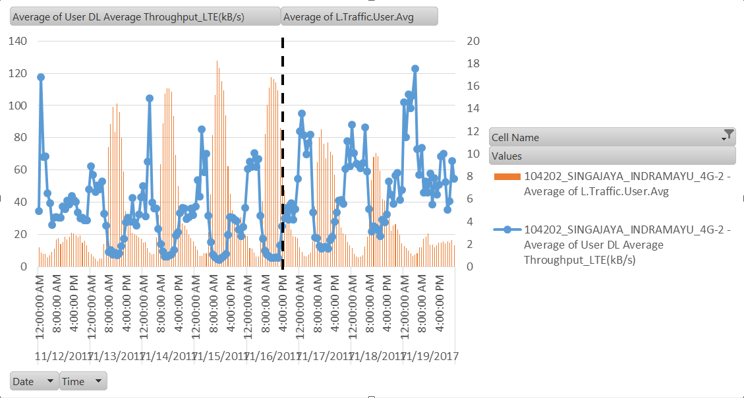
Welcome back again to my blog. In this Article I would like to share about RRC Setup Success Rate Improvement in Worst performing cells (WPC) due to high rejection L.RRC.SetupFail.NoReply in 4G LTE Huawei. Rejection of  L.RRC.SetupFail.NoReply commonly due to coverage issue such as overshooting but I have experienced low RRC Setup Success Rate was due to low user(low sample) and the rejection still figure out by L.RRC.SetupFail.NoReply. Previously I was tried to clear up No reply by reset MRFU and swap MRFU to other sector (I thought may be because RF module problem because User's are very low) but still no improvement. I also did Physical tuning by down tilt Antenna 2 degree from previous configuration ( I thought may be due to coverage issue) and the result is nothing.Finally I get some improvement after reazimuth antenna and up tilt to get more user's.RRC setup success rate was improved,traffic increased and L.RRC.SetupFail.NoReply has cleared after reorientation and up tilt antenna.This action is working to improve RRC Setup Success Rate in cells with low user's(commonly L.Traffic.User.Avg less than 10).
Graph below is the result of RRC Setup Success Rate Improvement after Physical Optimization  ; Re-azimuth from 340 to 290 and  set  Total Tilt from 11 to 6 in 601116 sector-3.
RRC Setup Success Rate Improvement
L.RRC.SetupFail.NoReply


From above chart Traffic and RRC setup SR have improved after Physical Optimization ; Re-azimuth from 340 to 290 and  set  Total Tilt from 11 to 6 on 15 November 2017,L.RRC.SetupFail.NoReply also decreased(improved). So in my opinion, here are the conclusion to improve RRC Setup Success Rate:
1. Check  number of user in counter L.Traffic.User.Avg, if less than 10 then try to reazimuth to potential coverage or up tilt to obtain more traffic.
2. Check TA coverage for cells with high number of user(L.Traffic.User.Avg>50),if found high TA then try reduce coverage by down tilt antenna(suspect low RRC setup SR due to overshooting).
3. Next action may be reset MRFU or try swap to other sector if suspect RF module issue.

If you have other solution or experienced in improving RRC Setup Success Rate,you can share or give feedback in comment,so will help other people in improving Network KPI.

You might also need to know:
4G-4G Traffic sharing for LTC(Low Throughput Cells) improvement in Huawei LTE
2G to 4G LTE Cell reselection Parameter setting in Huawei Network
Enable PS Redirection from 3G to 4G in Huawei Network
3G Call SetUp Time(CST) optimization by EFD state transition optimization in Huawei
3G UMTS/WCDMA Drop Call Rate Improvement(DCR CS/PS) in 3G Network Huawei
VQI Optimization Improvement by turn off Speech codec 5.9, 7.4 and 4.75 Kbps in Huawei 2G Network
VQI(Voice Quality Index) and Drop Call rate improvement in 2G Huawei by Setting more Full Rate and redimension channel
2G Theory and Concept
Common question about RF Optimization
TCH Block Rate Optimization Tips in Huawei GSM
2G Voice Quality Improvement by TRX Layering priority in Huawei GSM
TBF Drop Improvement tips in Huawei GSM
GPRS Packet Data Access Success Rate(PDASR) Improvement in Huawei GSM
Call Drop Rate improvement by Parameter change in 3G UMTS/WCDMA Huawei Network
Trial Power Control in GSM Huawei for Quality Improvement
Power Control activation for Electricity Saving in Huawei GSM
Handover Meaning in GSM and How to Optimize Handover Success Rate (HOSR) for GSM KPI Improvement
WCDMA CSSR Optimization Tips
CSSR Optimization for GSM and WCDMA
Drop Call Rate Optimization, How to identify and finding root cause for Optimization solution on GSM and UMTS Network

Wednesday, 22 November 2017

4G-4G Traffic sharing for LTC(Low Throughput Cells) improvement in Huawei LTE


In This Chapter I would like to share about LTC improvement by traffic sharing/offload traffic 4G-4G in Huawei 4G LTE. There are many way to improve throughput in 4G Huawei such as:Bandwidth Upgrade,Sharing traffic 4G-3G,sharing traffic 4G-4G(High traffic 4G cells to surroundings low traffic), Parameter adjustment such as:activate EPFENHANCEDSWITCH,Clearing overshooting,Upgrade transmission Capacity,Physical traffic sharing(antenna adjustment) and etc.

User DL Throughput will be improved by traffic sharing only if surroundings cells are in light load(not high traffic) because traffic shifting from cells with low throughput  to surroundings cells with low traffic and high throughput. Choose candidate cells for sharing traffic manually in map to maximize the result.Here are parameter setting that need to be set for 4G sharing traffic in Huawei LTE:

Parameter setting in cells LTC(Low Throughput cells):
Parameter Throughput Improvement Huawei 4G LTE


Parameter setting in Candidate cells:


Script for Source_Congested cells:MOD EUTRANINTRAFREQNCELL: LocalCellId=XX, Mcc="YYY", Mnc="ZZ", eNodeBId=AA, CellId=BB, CellIndividualOffset=dB10, CellQoffset=dB-10, CellMeasPriority=HIGH_PRIORITY;  {NE Name}

Script for Target Non-Congested cells: MOD EUTRANINTRAFREQNCELL: LocalCellId=XX, Mcc="YYY", Mnc="ZZ", eNodeBId=AA, CellId=BB, CellIndividualOffset=dB-10, CellQoffset=dB10;  {NE NAME}

Fallback Script:
MOD EUTRANINTRAFREQNCELL: LocalCellId=XX, Mcc="YYY", Mnc="ZZ", eNodeBId=AA, CellId=BB, CellIndividualOffset=dB0, CellQoffset=dB0;  {NE NAME}

Here are the result after sharing traffic/offload 4G traffic to surroundings:
Mostly User DL throughput improved in cell level and traffic move to surroundings
Throughput Improvement Huawei 4G LTE

Parameter Description:
CellIndividualOffset:
Indicates the cell individual offset for the inter-frequency neighboring cell, which is used in evaluation for handovers. It affects the probability of triggering inter-frequency measurement reports. A larger value of this parameter indicates a higher probability.
Impact on radio Network:
A larger value of this parameter results in a larger probability of triggering measurement reporting and handovers, increasing the number of handovers. A smaller value of this parameter results in the opposite effects. Whether the value of this parameter is too large or too small, the handover success rate decreases

CellQoffset:Indicates the offset for the inter-frequency neighboring cell, which is used in evaluation for cell reselections. A larger value of this parameter results in a lower probability of cell reselections. If this parameter is not set to dB0, it is delivered in SIB5. For details, see 3GPP TS 36.331. If this parameter is set to dB0, it is not delivered in SIB5. In this situation, UEs use 0 dB as the offset for cell reselections.
Impact on radio Network:
A larger value of this parameter leads to a lower probability of reselections to an inter-frequency neighboring cell. A smaller value leads to the opposite effects. Whether the value of this parameter is too large or too small, the access success rate of the inter-frequency neighboring cell decreases

CellMeasPriority:
Indicates the priority of measurement on the inter-frequency neighboring cell. The eNodeB preferentially contains the information about a neighboring cell with this priority set to HIGH_PRIORITY while delivering a measurement configuration
Impact on radio Network:
In the measurement configuration for an inter-frequency handover, the eNodeB includes information about a limited number of inter-frequency neighboring cells whose cell individual offsets (CIOs) are not zero. If this parameter is set to HIGH_PRIORITY and this neighboring cell has a non-zero CIO, it is more likely that this neighboring cell is included in the measurement configuration, thereby increasing the probability of a timely handover to this inter-frequency neighboring cell. If this neighboring cell is eventually not included in the measurement configuration, the UE uses zero as the CIO for this neighboring cell during handover evaluation, resulting in a delayed or premature handover to this neighboring cell.

Thank you for reading this chapter related Throughput improvement by 4G-4G Traffic sharing to solve LTC(low throughput cells) in Huawei 4G LTE Network, hope can helpful and improve your network.

You might also need to know:
2G to 4G LTE Cell reselection Parameter setting in Huawei Network
Enable PS Redirection from 3G to 4G in Huawei Network
3G Call SetUp Time(CST) optimization by EFD state transition optimization in Huawei
3G UMTS/WCDMA Drop Call Rate Improvement(DCR CS/PS) in 3G Network Huawei
VQI Optimization Improvement by turn off Speech codec 5.9, 7.4 and 4.75 Kbps in Huawei 2G Network
VQI(Voice Quality Index) and Drop Call rate improvement in 2G Huawei by Setting more Full Rate and redimension channel
2G Theory and Concept
Common question about RF Optimization
TCH Block Rate Optimization Tips in Huawei GSM
2G Voice Quality Improvement by TRX Layering priority in Huawei GSM
TBF Drop Improvement tips in Huawei GSM
GPRS Packet Data Access Success Rate(PDASR) Improvement in Huawei GSM
Call Drop Rate improvement by Parameter change in 3G UMTS/WCDMA Huawei Network
Trial Power Control in GSM Huawei for Quality Improvement
Power Control activation for Electricity Saving in Huawei GSM
Handover Meaning in GSM and How to Optimize Handover Success Rate (HOSR) for GSM KPI Improvement
WCDMA CSSR Optimization Tips
CSSR Optimization for GSM and WCDMA
Drop Call Rate Optimization, How to identify and finding root cause for Optimization solution on GSM and UMTS Network

Tuesday, 21 March 2017

2G to 4G LTE Cell reselection Parameter setting in Huawei Network

This post will tell you about Parameter setting related Cell re-selection from 2G to 4G LTE in Huawei Network. If you have new 4G network in your project and Inter working system 2G to 4G will be set properly, this post will be useful for you.Here are important parameter that need to  be set regarding 2G to 4G Cell reselection in Huawei Network.

-LTECELLRESELEN = YES(Enable Cell reselection GSM to LTE)
-GERANPRI =1(Cell reselection Priority LTE>UMTS>GSM)
-UTRANPRI =3(Cell reselection Priority LTE>UMTS>GSM)
-EUTRANPRI=6(Cell reselection Priority LTE>UMTS>GSM)
-THRUTRANHIGH=5
-UTRANQRXLEVMIN=2
-THREUTRANHIGH=9
-EUTRANQRXLEVMIN=6 (Minimum RSRP to camp on LTE)
-THREUTRANLOW=9
-QPEUTRAN=15

Description of all above parameter can be listed as below :
-LTECELLRESELEN:Whether to allow cell reselection from GSM to LTE cells. When this parameter is set to YES, cell reselection from GSM to LTE cells is allowed.
-GERANPRI:Common priority of GERAN. Value 0 indicates the lowest priority, and value 7 indicates the highest priority.
-UTRANPRI:Public priority of a neighboring UTRAN cell configured for an operator. Value 0 represents the lowest priority, value 7 represents the highest priority, and value 255 is invalid. This parameter corresponds to the DEFAULT_UTRAN_PRIORITY IE in SI23 in 3GPP TS 44.018.
The parameter value complies with the following rules:
1. If this parameter is set to a value other than 255, the parameter value is used.
2. If this parameter is set to 255, the value of [GCELLPRIEUTRANSYS:UTRANPRI] for the cell is used.
-EUTRANPRI:Public priority of a neighboring EUTRAN cell configured for an operator. Value 0 represents the lowest priority, value 7 represents the highest priority, and value 255 is invalid. This parameter corresponds to the DEFAULT_E-UTRAN_PRIORITY IE in SI23 in 3GPP TS 44.018.
The parameter value complies with the following rules:
1. If this parameter is set to a value other than 255, the parameter value is used.
2. If this parameter is set to 255, the value of [GCELLPRIEUTRANSYS:EUTRANPRI] for the cell is used.
-THRUTRANHIGH:High threshold of a neighboring UTRAN cell configured for an operator. When the measured RSCP/EcNo values of one or multiple neighboring UTRAN cells are higher than the threshold, UEs are allowed to reselect a neighboring UTRAN cell with a priority higher than that of a GERAN cell. This parameter corresponds to the THRESH_UTRAN_high IE in SI23 in 3GPP TS 44.018.
The mapping of parameter values onto actual values is:
0 = 0 dB,
1 = 2 dB,
2 = 4 dB,
3 = 6 dB,
...,
30 = 60 dB,
31 = 62 dB,
255 = invalid.
The parameter value complies with the following rules:
1. If this parameter is set to a value other than 255, the parameter value is used.
2. If this parameter is set to 255, the value of [GCELLPRIEUTRANSYS:THRUTRANHIGH] for the cell is used.
-UTRANQRXLEVMIN:Used to calculate the RSCP threshold for the target cell when a priority-based decision to perform GSM to UTRAN cell reselection is made.
The values of this parameter correspond to the following decibel values:
0: -119 dBm,
1: -117 dBm,
2: -115 dBm,
...,
30: -59 dBm,
31: -57 dBm.
-THREUTRANHIGH:High threshold of a neighboring EUTRAN cell configured for an operator. When the measured RSRP values of one or multiple neighboring EUTRAN cells are higher than the threshold, UEs are allowed to reselect a neighboring UTRAN cell with a priority higher than that of a GERAN cell. This parameter corresponds to the THRESH_E-UTRAN_high IE in SI23 in 3GPP TS 44.018.
The mapping of parameter values onto actual values is:
0 = 0 dB,
1 = 2 dB,
2 = 4 dB,
3 = 6 dB,
...,
30 = 60 dB,
31 = 62 dB,
255 = invalid.
The parameter value complies with the following rules:
1. If this parameter is set to a value other than 255, the parameter value is used.
2. If this parameter is set to 255, the value of [GCELLPRIEUTRANSYS:THREUTRANHIGH] for the cell is used.
-EUTRANQRXLEVMIN:Used to calculate the RSRP threshold for the target cell when a priority-based decision to perform GSM to EUTRAN cell reselection is made.
The values of this parameter correspond to the following decibel values:
0: -140 dBm,
1: -138 dBm,
2: -136 dBm,
...,
30: -80 dBm,
31: -78 dBm.
-THREUTRANLOW:Low threshold of a neighboring EUTRAN cell configured for an operator. A UE can reselect a neighboring EUTRAN cell that has a lower priority than the GERAN cell if the receive levels of the serving cell and all neighboring GSM cells are lower than the threshold specified by THRGSMLOW and the measured RSRP values of one or multiple neighboring EUTRAN cells are higher than the threshold. This parameter corresponds to the THRESH_E-UTRAN_low IE in SI23 in 3GPP TS 44.018.
The mapping of parameter values onto actual values is:
0 = 0 dB,
1 = 2 dB,
2 = 4 dB,
3 = 6 dB,
...,
30 = 60 dB,
31 = 62 dB,
255 = invalid.
The parameter value complies with the following rules:
1. If this parameter is set to a value other than 255, the parameter value is used.
2. If this parameter is set to 255, the value of [GCELLMOCNINTERRESEL:ThrEUTRANLow] is used. If the value of [GCELLMOCNINTERRESEL:ThrEUTRANLow] is 255, the value of [GCELLPRIEUTRANSYS:THREUTRANLOW] for the cell is used.
-QPEUTRAN:Threshold of signal level at which a mobile station starts to search for the target EUTRAN cell during cell reselection. In packet mode, if this parameter is set to a value lower than 7, the mobile station starts to search for an EUTRAN cell when the signal level of the serving cell is lower than the corresponding level threshold. If this parameter is set to a value higher than 7, the mobile station starts to search for an EUTRAN cell when the signal level of the serving cell is higher than the corresponding level threshold.

The values of this parameter correspond to the following decibel values:

0= -98dBm,

1= -94dBm,

2= -90dBm,
...,

7= (always), that is, the MS always searches for neighboring cells in EUTRAN.

8= -78dBm,

9= -74dBm,

10= -70dBm,
...,


14= -54dBm,

15= (never), that is, the MS never searches for neighboring cells in EUTRAN.


Those parameter are important parameter that need to be set in your network in order to enable cell re-selection 2G to 4G(LTE) in Huawei Network.Those parameter also need License, so be careful and check license first before implemented.


You might also need to know:

Enable PS Redirection from 3G to 4G in Huawei Network

In this sharing, I would like to share you about how to Enable PS Redirection from 3G to 4G in Huawei Network. In The beginning of new 4G network in my project this kind activity would be done in Optimization activity. Here are some parameter in 3G that need to be created in CR (Change Request) regarding enabling PS Redirection from 3G to 4G LTE in Huawei Network.

//PS HO & redirection due to Load related
MOD UCELLLDR: CellId=xxx, DlLdr(Third)Action=PSInterU2LLDHO, UlLdr(Third)Action=PSInterU2LLDHO, UlPSU2LHOUeNum=1, DlPSU2LHOUeNum=1;(SET FOR LAST ACTION)

SET UCORRMALGOSWITCH: HoSwitch=HO_LTE_PS_OUT_SWITCH-1&HO_LTE_SERVICE_PS_OUT_SWITCH-1,HOSWITCH1=HO_U2L_COV_PS_REDIRECT_SWITCH-1&HO_U2L_LOAD_PS_REDIRECT_SWITCH-1;
MOD ULTENCELL: RNCId=xxx, CellId=xxx, LTECellIndex=xxx, BlindFlag=TRUE; (Colo Only)
MOD ULTECELL: LTECellIndex=xxx, SuppPSHOFlag=NotSupport;
SET UHOCOMM: U2LBlindRedirPingpongTimer=60;
MOD UCELLHOCOMM: CellId=xxx, U2LBlindRedirSwitch=ON;
MOD UTYPRABBASIC: RabIndex=xxx, EUTRANSHIND=HO_TO_EUTRAN_SHOULD_BE_PERFORM;(all RABINDEX for CNDOMAINID = PS_DOMAIN)

SET UU2LTEHOCOV: LTEReportMode=EVENT_TRIGGER, UsedFreqThdRSCP=-107, LTEMeasQuanOf3A=RSRP, Hystfor3A=4, TrigTime3A=D0, U2LTEFilterCoef=D3, U2LTEMeasTime=30, TargetRatThdRSRP=36,TargetRatThdRSRQ=20;
ADD UCELLU2LTEHOCOV: CellId=xxx, LTEReportMode=EVENT_TRIGGER, LTEMeasQuanOf3A=RSRP, UsedFreqThdRSCP=-107, Hystfor3A=4, TrigTime3A=D0, U2LTEFilterCoef=D3, U2LTEMeasTime=30,TargetRatThdRSRP=36, TargetRatThdRSRQ=20;

SET UU2LTEHONCOV:LTEMEASTYPOF3C=MeasurementQuantity, U2LTEFILTERCOEF=D6, U2LTEMEASTIME=30, LTEMEASQUANOF3C=RSRP, HYSTFOR3C=2, TRIGTIME3C=D10, TARGETRATTHDRSRP=20, TARGETRATTHDRSRQ=30, BESTCELLTRIGLTEMEASSWITCH=OFF, U2LPUNISHTIMER=5, U2LPUNISHSWITCH=ON, ANTIPINPANLTEFDDREDRSWITCH=OFF, U2LPHYCHFAILNUM=3, PENALTYTIMEFORPHYCHFAIL=30, U2LSERVMCTIMEOUTPUNISHTIME=60,U2LSERVTRIGSOURCE=U2L_SERV_RAB_SETUP_TRIGGER-0&U2L_SERV_LOWACTIVE_TRIGGER-1&U2L_SERV_PERIOD_TRIGGER-1&U2L_SERV_RB_REL_TRIGGER-0&U2L_SERV_IUCS_REL_TRIGGER-0&U2L_SERV_OTHER_TRIGGER-0,U2LSERVPRDTRIGTIMERLEN=10, U2LNCOVRSCPTHD=-90, U2LNCOVRSCPPRDTIMER=D2000, SIGTARGETRATTHDRSRP=36, SIGTARGETRATTHDRSRQ=20, U2LTESIGMEASTIME=3, U2LPUNISHTIMERLENFORLOAD=0;

ADD UCELLU2LTEHONCOV:CELLID=xxx, LTEMEASTYPOF3C=MeasurementQuantity, U2LTEFILTERCOEF=D6, U2LTEMEASTIME=30, LTEMEASQUANOF3C=RSRP, HYSTFOR3C=2, TRIGTIME3C=D10,TARGETRATTHDRSRP=20,TARGETRATTHDRSRQ=30, BESTCELLTRIGLTEMEASSWITCH=OFF, U2LSERVTRIGSOURCE=U2L_SERV_RAB_SETUP_TRIGGER-0&U2L_SERV_LOWACTIVE_TRIGGER-1&U2L_SERV_PERIOD_TRIGGER-0&U2L_SERV_RB_REL_TRIGGER-0&U2L_SERV_IUCS_REL_TRIGGER-0&U2L_SERV_OTHER_TRIGGER-0,U2LSERVALGOSWITCH=HO_LTE_SERVICE_PSHO_OUT_SWITCH-0&HO_LTE_SERVICE_PS_OUT_SWITCH-1&HO_LTE_SERVICE_NEED_RSCP_SWITCH-1&HO_LTE_SERVICE_BLIND_FIRST_SWITCH-0, U2LNCOVRSCPTHD=-90, U2LGRIDINFOLOWTHD=1, U2LGRIDINFOHIGHTHD=99;

SET UCORRMALGOSWITCH: HoSwitch1=HO_U2L_REDIR_BASED_ABSOLUTE_FREQ_SWITCH-1;
SET UCORRMALGOSWITCH: PsSwitch=PS_CMACTIVE_PROCESS_OPT_SWITCH-1;
SET UCORRMPARA: PerfEnhanceSwitch5=PERFENH_U2L_SERV_NOT_TRIG_WHEN_CSPAGING-1;
SET UCORRMPARA:PERFENHANCESWITCH2=PERFENH_CS_P2D_TRIG_SERVICE_U2L_SWITCH-0&PERFENH_RB_RECFG_TRIG_SERVICE_U2L_SWITCH-0;
SET UHOCOMM: U2LBlindRedirPingpongTimer=60;
ADD UCELLCMUSERNUM: CellId=xxx, U2LNCovPSCmUserNumThd=20;
SET UCORRMPARA: PerfEnhanceSwitch2=PERFENH_PERMIT_U2L_ONLY_UE_FROM_L_SWITCH-1;
SET UCORRMALGOSWITCH: HoSwitch1=HO_IUR_U2L_REDIR_SWITCH-0;
SET UCMCF: McHsdpaLteCMPermissionInd=FALSE;
SET UCORRMALGOSWITCH:HoSwitch1=HO_MC_LTE_NCELL_COMBINE_SWITCH-0;
SET UCORRMPARA: PerfEnhanceSwitch2=PERFENH_LTE_NCELL_SEL_OPT_SWITCH-1;
SET UCORRMPARA: PerfEnhanceSwitch5=PERFENH_U2L_PUNISH_HOLD_WHEN_DF2P_SWITCH-1;
SET UCORRMPARA: PerfEnhanceSwitch5=PERFENH_IUCS_REL_TRIG_U2L_SERV_OP_SWITCH-1;
SET UCORRMPARA: PerfEnhanceSwitch5=PERFENH_CM_STATE_FORBID_CHL_RETRY_SWITCH-1;

All Above Parameter command are important that need to be set in RNC and Cell level for enabling PS redirection from 3G to 4G in Huawei Network.

You might also need to know
- 3G Call SetUp Time(CST) optimization by EFD state transition optimization in Huawei
- 3G UMTS/WCDMA Drop Call Rate Improvement(DCR CS/PS) in 3G Network Huawei
- VQI Optimization Improvement by turn off Speech codec 5.9, 7.4 and 4.75 Kbps in Huawei 2G Network
- VQI(Voice Quality Index) and Drop Call rate improvement in 2G Huawei by Setting more Full Rate and redimension channel
- 2G Theory and Concept
- Common question about RF Optimization
- TCH Block Rate Optimization Tips in Huawei GSM
- 2G Voice Quality Improvement by TRX Layering priority in Huawei GSM
- TBF Drop Improvement tips in Huawei GSM
- GPRS Packet Data Access Success Rate(PDASR) Improvement in Huawei GSM
- Call Drop Rate improvement by Parameter change in 3G UMTS/WCDMA Huawei Network
- Trial Power Control in GSM Huawei for Quality Improvement
- Power Control activation for Electricity Saving in Huawei GSM
- Handover Meaning in GSM and How to Optimize Handover Success Rate (HOSR) for GSM KPI Improvement
- WCDMA CSSR Optimization Tips
- CSSR Optimization for GSM and WCDMA
- Drop Call Rate Optimization, How to identify and finding root cause for Optimization solution on GSM and UMTS Network

3G Call SetUp Time(CST) optimization by EFD state transition optimization in Huawei

In this Post I'm going to share about Call Set up Time(CST) Optimization in 3G by EFD(Enhanced Fast Dormancy) state transition Optimization in Huawei Network. The step is performed by modify RNC Parameter related EFD state transition by Choose P2F2D rather than P2D transition in CST(Call Set up Time).
P2F2D = PCH to FACH to DCH
P2D = PCH to DCH.

The Background of this activity:
- CS  Setup after P2D needs activation time, while P2F2D doesn’t need
- CS RB SETUP Message sent on DCH consumes more time than that on FACH.
(the signaling bit rate of DCH is 13.6Kbps, while the signaling bit rate of FACH is 25.6Kbps).

The step for this activity is just to activate and running command as below Script:
MML(R16):
SET URRCTRLSWITCH: OptimizationSwitch=CS_SETUP_P2D_SWITCH-0;
SET URRCTRLSWITCH: OptimizationSwitch4=RB_SETUP_F2D_USE_AM_RLC_SWITCH-1;

Based on trial in my project, CST improved from 8.8ms to 8.6ms(1%)

Please note this method of CST(Call Set up Time) optimization is not my initiation, but based on expert people in my project and already implemented all RNC's. Hope this post will be use full for you regarding Call Setup Optimization Time. Thanks.

You might also Need to know:
- 3G UMTS/WCDMA Drop Call Rate Improvement(DCR CS/PS) in 3G Network Huawei
- VQI Optimization Improvement by turn off Speech codec 5.9, 7.4 and 4.75 Kbps in Huawei 2G Network
- VQI(Voice Quality Index) and Drop Call rate improvement in 2G Huawei by Setting more Full Rate and redimension channel
- 2G Theory and Concept
- Common question about RF Optimization
- TCH Block Rate Optimization Tips in Huawei GSM
- 2G Voice Quality Improvement by TRX Layering priority in Huawei GSM
- TBF Drop Improvement tips in Huawei GSM
- GPRS Packet Data Access Success Rate(PDASR) Improvement in Huawei GSM
- Call Drop Rate improvement by Parameter change in 3G UMTS/WCDMA Huawei Network
- Trial Power Control in GSM Huawei for Quality Improvement
- Power Control activation for Electricity Saving in Huawei GSM
- Handover Meaning in GSM and How to Optimize Handover Success Rate (HOSR) for GSM KPI Improvement
- WCDMA CSSR Optimization Tips
- CSSR Optimization for GSM and WCDMA
- Drop Call Rate Optimization, How to identify and finding root cause for Optimization solution on GSM and UMTS Network

Monday, 13 February 2017

3G UMTS/WCDMA Drop Call Rate Improvement(DCR CS/PS) in 3G Network Huawei

Today I would like to share 3G UMTS/WCDMA Drop Call Rate Improvement in 3G Network Huawei. Some parameter for drop call rate improvement especially for CS service in 3G network need to adjust to improve DCR CS. Drop call in 3G network is one of KPI that need to be optimized especially when customer ask for KPI improvement on the Network. Parameter below can be implemented to improve drop call rate in 3G Network Huawei especially for CS service(DCR CS).

1. Enable CS_DISCONNECT_OPT_SWITCH 
2. Enable RRC_SCRI_NORM_REL_SWITCH

Description of each parameter:
- CS_DISCONNECT_OPT_SWITCH
Whether the RNC performs optimized processing if the UE does not respond within 3 seconds after receiving a DIRECT TRANSFER message from the CN during a CS call release. The value of the IE Message Type in the DIRECT TRANSFER message is Disconnect.
1: This switch is turned on. The RNC creates a DIRECT TRANSFER message and sends it to the CN. The value of the IE Message Type in the DIRECT TRANSFER message is Release.
0: This switch is turned off. The RNC does not create the DIRECT TRANSFER message

Script to enable this Switch:
SET URRCTRLSWITCH:IMPROVEMENTSWITCH=CS_DISCONNECT_OPT_SWITCH-1;
- RRC_SCRI_NORM_REL_SWITCH (Switch for Performing the Optimized RRC Connection Release Procedure on Receipt of a SIGNALLING CONNECTION RELEASE INDICATION Message)
1: This switch is turned on. The RNC initiated the normal release process after receive SIGNALLING CONNECTION RELEASE INDICATION message from UE.
0: This switch is turned off. The RNC does not handle SIGNALLING CONNECTION RELEASE INDICATION message during the process.

Script to enable this Switch:
SET URRCTRLSWITCH:PROCESSSWITCH2=RRC_SCRI_NORM_REL_SWITCH-1;

The other way to improve 3G DCR CS/PS in 3G UMTS/WCDMA Huawei  Network:

1. SHO Optimization (Recommended for Outer Cells)
- MOD UCELLINTRAFREQHO:RNCID=xxx,CELLID=xxx,SHOQUALMIN=-24;
- INTRARELTHDFOR1ACSNVP & INTRARELTHDFOR1BCSNVP = existing + 2
2. RL Power Optimization (Recommended for Cells with high Uu No Reply, Value adjust based on cells with high VS.RAB.FailEstabCS.UuNoReply)
- MOD UCELLRLPWR: CELLID=XXXXX, CNDOMAINID=CS_DOMAIN, MAXBITRATE=12200, RLMAXDLPWR=20, RLMINDLPWR=-140;
3.Radio Link Optimization (Recommended for RNC Level)
- SET UCORRMALGOSWITCH:MAPSWITCH=MAP_CSPS_RL_RESET_0K_LIMIT_SWITCH-1;
- SET UCORRMPARA:PERFENHANCESWITCH3=PERFENH_RLRESETUP_GUARANTEE_SWITCH-1,PERFENHANCESWITCH5=PERFENH_FACH_TVM_MC_TIME_OPT_SWITCH-1;
- SET URRCTRLSWITCH:PROCESSSWITCH4=RRC_CELLFACH_DL_TRB_RESET_TO_F2D_SWITCH-1,OPTIMIZATIONSWITCH6=ASU_RSP_FAIL_REL_UE-1&CS_TRIG_PS_F2D_SWITCH-1;
Graph below show the result of above parameter changes to improve Drop call rate(DCR CS/PS):

The result show significant improvement for Drop call rate in 3G Huawei network both DCR CS and DCR PS. For Other vendor(Nokia/Ericsson) you can find similar parameters or read parameter mapping between vendor.

You might also Need to know:


Thursday, 17 November 2016

Parameter Setting Keep Voice Traffic in 3G Network Huawei

Keep Voice Traffic in 3G network is one of strategic optimization in Cellular network. The reasons why should keep traffic in 3G shall be: 2G network Congestion/Blocking issue,2G network problem(HW/issue,Interference) even 2G network will be dismantled.

Today I would like to share Parameter setting to keep voice traffic in 3G due to 2G network Capacity will be decreased caused 4G Network will be deployed and use 2G Bandwidth. 2G will be dismantled due to 4G Network will be implemented so voice traffic will be keep in 3G network and all parameter that previously sharing to 2G will be disabled.

Below are list parameter in 3G Huawei to keep voice traffic in 3G network:
1. Decrease value setting of  2D/2F: 
  INTERRATCSTHD2DECN0: ex:-14 to -20
  INTERRATCSTHD2FECN0: ex:-12 to -18
  INTERRATCSTHD2DRSCP ex:-100 to -105
  INTERRATCSTHD2FRSCP ex: -97 to - 102
2. Decrease value setting of QQUALMIN ex: -18 to -22
3. Decrease value setting of FDDQMIN ex: -14 to -20(SET GCELLCCUTRANSYS in 2G side)
4. Remove IRATCS in UCELLLDR :  CSInterRatShouldNotLDHO/CSInterRatShouldBeLDHO
5. Setting SBHO to OFF : CSSERVICEHOSWITCH=OFF (Command:UCELLHOCOMM)

Detail Parameter can be described as follow:

INTERRATCSTHD2DECN0:
Threshold of triggering inter-RAT measurement for CS services when measurement quantity is Ec/No. The threshold of triggering the inter-RAT measurement (the threshold of enabling the compressed mode) is a key parameter in the inter-RAT handover policy. The setting of this parameter affects the proportion of the UEs in compressed mode in a cell and the success rate of the hard handover. The setting of this parameter should consider two factors, moving speed of the UE and cell radius. When Ec/No is used as the measurement quantity for CS services, the UE reports event 2D when the measured Ec/No value is lower than this threshold. Then, the RNC sends the signaling to enable the compressed mode and start inter-RAT measurement. For the UE moving at a speed of 5 km/h, the recommended threshold is -17 dB; for the UE moving at a speed of 50 km/h, the recommended threshold is -14 dB; for the UE moving at a speed of 120 km/h, the recommended threshold is -12 dB. In actual networks, set this parameter to -14 dB because the UEs in a cell usually move at different speeds. The emulation result shows that the call drop rate remains low for the UEs moving at a speed of 120 km/h when this parameter is set to -14 dB. If the cell is a macro cell, it indicates that micro cells exist in this cell. To enable the micro cells to handle more traffic, the compressed mode start and stop thresholds should be set higher, that is, the thresholds for events 2D and 2F using CPICH RSCP are set higher. If the cell is a micro cell, the default value should be modified according to the link budgeting result. Event 2D and event 2F are used to enable and disable the compressed mode respectively. When the cell is located in the center of the frequency coverage or the inter-frequency measurement quantity uses both Ec/No and RSCP, then the Ec/No value is used as the criterion for events 2D and 2F. To enable the compressed mode earlier, increase the threshold of triggering event 2D; otherwise, decrease the threshold of triggering event 2D. To prevent the frequent enabling and disabling of the compressed mode, increase the difference between the thresholds of triggering event 2D and event 2F. Event 2D and event 2F are used to enable and disable the compressed mode respectively in inter-RAT measurement. The requirements on the signal quality and inter-RAT handover policies vary with the service type. Therefore, the thresholds of enabling and disabling inter-RAT measurement are distinguished by CS, PS, and signaling. To enable the compressed mode earlier, increase the threshold of triggering event 2D; otherwise, decrease the threshold of triggering event 2D. To prevent the frequent enabling and disabling of the compressed mode, increase the difference between the thresholds of triggering event 2D and event 2F.

INTERRATCSTHD2FECN0:
Threshold of stopping inter-RAT measurement for CS services when measurement quantity is Ec/No. The threshold of stopping the inter-RAT measurement (the threshold of disabling the compressed mode) is a key parameter in the inter-RAT handover policy. The setting of this parameter affects the proportion of the UEs in compressed mode in a cell and the success rate of the hard handover. The setting of this parameter should consider two factors, moving speed of the UE and cell radius. When Ec/No is used as the measurement quantity for CS services, the UE reports event 2F when the measured Ec/No value is higher than the value of this parameter. Then, the RNC sends the signaling to disable the compressed mode and stop the inter-frequency measurement. If the cell is a macro cell, it indicates that micro cells exist in this cell. To enable the micro cells to handle more traffic, the compressed mode start and stop thresholds should be set higher, that is, the thresholds for events 2D and 2F using CPICH RSCP are set higher. If the cell is a micro cell, the default value should be modified according to the link budgeting result. Event 2D and event 2F are used to enable and disable the compressed mode respectively. When the cell is located in the center of the frequency coverage or the inter-frequency measurement quantity uses both Ec/No and RSCP, then the Ec/No value is used as the criterion for events 2D and 2F. To enable the compressed mode earlier, increase the threshold of triggering event 2D; otherwise, decrease the threshold of triggering event 2D. To prevent the frequent enabling and disabling of the compressed mode, increase the difference between the thresholds of triggering event 2D and event 2F.

INTERRATCSTHD2DRSCP:
Threshold of triggering inter-RAT measurement for CS services when measurement quantity is RSCP. When RSCP is used as the measurement quantity for CS services, the UE reports event 2D when the measured RSCP value is lower than this threshold. Then, the RNC sends the signaling to enable the compressed mode and start the inter-RAT measurement. To enable the compressed mode earlier, increase the threshold of triggering event 2D; otherwise, decrease the threshold of triggering event 2D. To prevent the frequent enabling and disabling of the compressed mode, increase the difference between the thresholds of triggering event 2D and event 2F. In most cases, users want to be maintained within a 3G network. Therefore, the start threshold of the inter-RAT measurement is set smaller than that of the inter-frequency measurement in order to trigger inter-frequency easily. In scenarios where inter-frequency neighboring cells are unavailable or where inter-frequency coverage is insufficient, the inter-RAT measurement start threshold should be set relatively larger in order to trigger inter-RAT measurement easily, thus reducing call drops.

INTERRATCSTHD2FRSCP:
Threshold of stopping inter-RAT measurement for CS services when measurement quantity is RSCP. When RSCP is used as the measurement quantity for CS services, the UE reports event 2F when the measured RSCP value is larger than this threshold. Then, the RNC sends the signaling to disable the compressed mode and stop the inter-RAT measurement.

QQUALMIN:
Minimum CPICH Ec/No for the neighboring cell on cell reselection. The neighboring cell can be involved in cell sorting for reselection only when its CPICH Ec/No is above this threshold. If this parameter is set to the same value as Qqualmin for the serving cell, Qqualmin is not contained in SIB11 or SIB12. In this case, the UE extracts the Qqualmin from SIB3. For details, see the 3GPP TS 25.331. According to the 3GPP TS 25.304, S criterion for cell reselection is defined as follows: Srxlev > 0 and Squal > 0 Here, Squal = Qqualmeas - Qqualmin Srxlev = Qrxlevmeas - Qrxlevmin - Pcompensation "Qqualmeas" refers to the measured CPICH Ec/No. "Qrxlevmeas" refers to the CPICH RSCP. "Qrxlevmin" refers to the minimum CPICH receive power in the current cell. Pcompensation = max(UE_TXPWR_MAX_RACH - P_MAX, 0) "UE_TXPWR_MAX_RACH", also named as "MaxAllowedULTxPower", refers to the maximum uplink transmit power when the UE accesses a cell. "P_MAX" refers to the maximum RF output power of the UE.

FDDQMIN:
This parameter specifies one of the parameters for FDD cell reselection. A FDD cell becomes a candidate cell if all the following conditions are met for five consecutive seconds: 1.Receive level of the FDD cell > Average receive level of the current serving cell + "FDD Q offset"; The FDD cell meets the following condition in the case of any neighboring 2G cell: Receive level of the FDD cell > Receive level of any neighboring 2G cell + "FDD Q offset"; 2. Ec/No of the FDD cell > "FDD Qmin" - "FDD Qmin Offset"; 3. Receive level of the FDD cell > "RSCP Threshold"; If multiple FDD cells meet the preceding conditions, the MS reselects the cell with the strongest receive level. See 3GPP TSs 45.008 and 25.304. The values of this parameter correspond to the following decibel values: 0: -20 dB, 1: -6 dB, 2: -18 dB, 3: -8 dB, 4: -16 dB, 5: -10 dB, 6: -14 dB, 7: -12 dB.

UCELLLDR: 
Remove: CSInterRatShouldNotLDHO/CSInterRatShouldBeLDHO
DL LDR first action-10th/UL LDR first action-8 action:
NOACT: No load reshuffling action is taken. INTERFREQLDHO: The inter-frequency load handover is performed. BERATERED: Channels are reconfigured for the BE service. QOSRENEGO: The renegotiation on the QoS of the uncontrollable real-time service is performed. CSINTERRATSHOULDBELDHO: The inter-RAT SHOULDBE load handover of the CS domain is performed. PSINTERRATSHOULDBELDHO: The inter-RAT SHOULDBE load handover of the PS domain is performed. AMRRATERED (AMR service rate decreasing): The setting of the TFC subset and the negotiation of the service rate can be performed for the AMR voice service. MBMSDECPOWER (MBMS power limiting): The MBMS service is configured with the minimum power. CODEADJ (code tree reshuffling): The fragments of the downlink code tree are arranged. PSINTERRATSHOULDNOTBELDHO: The inter-RAT SHOULDNOTBE load handover of the PS domain is performed. PSINTERRATSHOULDNOTLDHO: The inter-RAT SHOULDNOTBE load handover of the PS domain is performed. The LDR takes the actions in the preset sequence and judges whether each action is successful. If an action is unsuccessful, the LDR turns to the next action. If an action is successful, a parameter is set to NOACT, or all the preceding actions are taken, the downlink LDR is finished, and the system waits for the next triggering of the LDR. Because each action is performed by its algorithm module, the LDR algorithm only selects users and delivers control messages, the execution result of each action can be obtained after a delay, and the LDR algorithm cannot wait for a long time, so the LDR can only judge whether the actions succeed by whether candidate users are found. The inter-frequency load handover has no impact on the QoS of users and can balance the cell load, so the inter-frequency load handover usually serves as the first action. The BE service rate reduction is effective only when the DCCC algorithm is enabled.

Step each command script are as follow:
1. UINTERRATHOCOV(RNC Parameter)
UINTERRATHOCOV


Script:
SET UINTERRATHOCOV:INTERRATCSTHD2DECN0=-20,INTERRATCSTHD2FECN0=-18,INTERRATCSTHD2DRSCP=-105,INTERRATCSTHD2FRSCP=-102;

Fallback:
SET UINTERRATHOCOV:INTERRATCSTHD2DECN0=-14,INTERRATCSTHD2FECN0=-12,INTERRATCSTHD2DRSCP=-100,INTERRATCSTHD2FRSCP=-97;

2. UCELLINTERRATHOCOV(Cells Parameter)
UINTERRATHOCOV


Script:
MOD UCELLINTERRATHOCOV:CELLID=30289,INTERRATCSTHD2DECN0=-20,INTERRATCSTHD2FECN0=-18,INTERRATCSTHD2DRSCP=-105,INTERRATCSTHD2FRSCP=-102;

Fallback:
MOD UCELLINTERRATHOCOV:CELLID=30289,INTERRATCSTHD2DECN0=-10,INTERRATCSTHD2FECN0=-8,INTERRATCSTHD2DRSCP=-90,INTERRATCSTHD2FRSCP=-87;

3. a.UCELLLDR(DL)
UCELLLDR


Script:
MOD UCELLLDR:CELLID=30639,DLLDRTHIRDACTION=PSInterRatShouldNotLDHO,DLLDRFOURTHACTION=InterFreqLDHO,DLLDRFIFTHACTION=NoAct;

Fallback:
MOD UCELLLDR:CELLID=30639,DLLDRTHIRDACTION=CSInterRatShouldNotLDHO,DLLDRFOURTHACTION=PSInterRatShouldNotLDHO,DLLDRFIFTHACTION=InterFreqLDHO;

3.b.UCELLLDR(UL)
UCELLLDR


Script:
MOD UCELLLDR:CELLID=30639,ULLDRSECONDACTION=PSInterRatShouldNotLDHO,ULLDRTHIRDACTION=InterFreqLDHO,ULLDRFOURTHACTION=NoAct

Fallback:
MOD UCELLLDR:CELLID=30639,ULLDRSECONDACTION=CSInterRatShouldNotLDHO,ULLDRTHIRDACTION=PSInterRatShouldNotLDHO,ULLDRFOURTHACTION=InterFreqLDHO;

4. UCELLHOCOMM
UCELLHOCOMM


Script:
MOD UCELLHOCOMM: CellId=39251, CSSERVICEHOSWITCH=OFF;

Fallback:
MOD UCELLHOCOMM: CellId=39251, CSSERVICEHOSWITCH=ON;

Above parameter mentioned are valid only for Huawei Network because we are in Huawei project.
Hope can use full for you who want to know deep about keeping voice traffic in 3G instead of 2G network for voice quality improvement.

You might also Need to know:


Thursday, 7 July 2016

VQI Optimization Improvement by turn off Speech codec 5.9, 7.4 and 4.75 Kbps in Huawei 2G Network

In this chapter I would like to share about VQI(Voice Quality Index) improvement in Huawei 2G Network by setting off Several speech codec.Turn off speech codec is a better way to improve Voice Quality Index(VQI) in 2G network and Your KPI will improve significantly. As I share before, we can also improve VQI by setting more Full rate and re-dimension channel. Setting more Full rate and re-dimension channel to be More TCHFR also working but you will get more result and significant improvement on VQI by turn off several lower codec 5.9, 7.4 and 4.75 Kbps. Here is the result of VQI after turn off codec 5.9, 7.4 and 4.75 kbps in Huawei 2G network.
VQI Optimization improvement tips in 2G Huawei Network

VQI Optimization improvement tips in 2G Huawei Network
From the above Graph we can see the result of  VQI 3.5 improved significantly after turn off speech codec 5.9,7.4 and 4.75 Kbps. Now you can trial and implement also in your Network to get same result for the optimization improvement.Detail technical step and parameter change can be shown as below list.
Turn off lower speech codec 2G Huawei for VQI Improvement


Script Parameter change for above change request:
SET GCELLCCAMR:IDTYPE=BYID,CELLID=XXX,,ACTCDSETF=4_75KBIT/S-0&5_15KBIT/S-0&5_90KBIT/S-0&6_70KBIT/S-0&7_40KBIT/S-0&7_95KBIT/S-0&10_2KBIT/S-0&12_2KBIT/S-1;

Conclusion to improve Voice Quality index(VQI) in Huawei 2G Network:
1. Increase Full rate and re-dimension channel, result==>Little bit VQI improvement
2. Turn off codec 5.9,7.4 and 4.75 Kbps, result==>Significant VQI Improvement

You might also Need to know:
- VQI(Voice Quality Index) and Drop Call rate improvement in 2G Huawei by Setting more Full Rate and redimension channel
- 2G Theory and Concept
- Common question about RF Optimization
- TCH Block Rate Optimization Tips in Huawei GSM
- 2G Voice Quality Improvement by TRX Layering priority in Huawei GSM
- TBF Drop Improvement tips in Huawei GSM
- GPRS Packet Data Access Success Rate(PDASR) Improvement in Huawei GSM
- Call Drop Rate improvement by Parameter change in 3G UMTS/WCDMA Huawei Network
- Trial Power Control in GSM Huawei for Quality Improvement
- Power Control activation for Electricity Saving in Huawei GSM
- Handover Meaning in GSM and How to Optimize Handover Success Rate (HOSR) for GSM KPI Improvement
- WCDMA CSSR Optimization Tips
- CSSR Optimization for GSM and WCDMA
- Drop Call Rate Optimization, How to identify and finding root cause for Optimization solution on GSM and UMTS Network